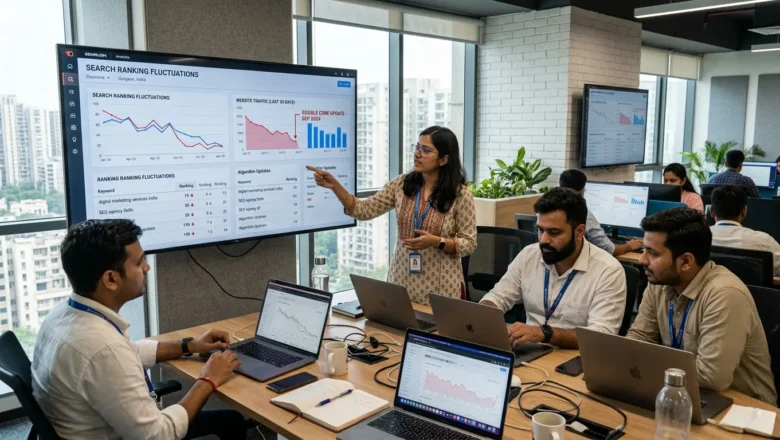
Google Search Console Impression Bug Fix: Why SEO Metrics May Suddenly Drop


Recently, Google confirmed a reporting error in Google Search Console that inflated impression counts for many websites.
As the Google Search Console impression bug fix rolls out, site owners may notice a sudden drop in reported impressions.
However, Google clarified that clicks, traffic, and rankings were not affected. The issue was limited to how impressions were logged in the reporting system.
For SEO professionals, this means data interpretation — not performance — is changing.
What Caused the Search Console Impression Reporting Error
According to recent reports, a logging error began affecting Google Search Console data starting May 13, 2025.
This bug caused the platform to over-report impressions in the Performance report, giving the appearance of higher visibility than actually existed.
Google stated the issue was related to data logging systems rather than search ranking algorithms.
Once the Google Search Console impression bug fix is fully implemented, reporting will return to accurate measurement.
Because of this correction, many sites may see impressions decline in Search Console dashboards, even though their actual search visibility remains unchanged.
Why SEO Reports May Suddenly Show Lower Impressions
The most noticeable impact of the Google Search Console impression bug fix is a drop in reported impressions.
This does not necessarily indicate an SEO problem.
Instead, it reflects the removal of inflated data from previous reporting periods.
SEO analysts should compare metrics carefully:
- If clicks remain stable, the issue is likely reporting correction.
- If CTR increases, it may be due to lower but more accurate impression counts.
- If traffic in Google Analytics remains stable, rankings likely remain unaffected.
This is why SEO teams are advised not to panic when impression numbers suddenly decline.
How to Audit Search Console Data After the Bug Fix
SEO professionals should conduct a structured audit to understand the impact of the Google Search Console impression bug fix.
1. Check Click Data First
Clicks represent real user visits.
If clicks remain stable while impressions drop, the issue is likely data correction rather than ranking loss.
2. Compare Google Analytics Traffic
Verify organic traffic trends using Google Analytics 4 (GA4) or server logs.
If GA4 traffic is stable while Search Console impressions decline, the change is purely reporting related.
3. Review Brand vs Non-Brand Queries
Google recently introduced branded vs non-branded query filters in Search Console.
These filters help identify whether visibility changes affect:
- Brand awareness searches
- Organic discovery searches
Analyzing these segments helps clarify content strategy performance.
4. Export Historical Search Data
Search Console only stores 16 months of historical data.
Exporting historical reports ensures SEOs maintain baseline metrics for:
- AI Overviews impact
- Core updates
- Algorithm shifts
FAQs
What is the Google Search Console impression bug fix?
The Google Search Console impression bug fix corrects a reporting error that caused impressions to be overcounted in the Performance report. The issue affected data logging, not search rankings. As the fix rolls out, reported impressions may decrease to reflect accurate data.
Why are impressions dropping in Google Search Console?
Impressions may drop because Google is correcting previously inflated data. The decrease does not necessarily mean your website lost visibility. In many cases, clicks and rankings remain unchanged.
Did the Google Search Console bug affect website rankings?
No. Google confirmed that the bug only impacted how impressions were recorded in reports. Search rankings, clicks, and actual organic traffic were not affected by this issue.
How can I verify if the impression drop is due to the bug fix?
Compare Search Console data with Google Analytics 4 or server logs. If clicks and organic traffic remain stable while impressions drop, the change is likely caused by the reporting correction.
Should SEO teams worry about a sudden drop in impressions?
Not immediately. First check whether clicks and traffic remain stable. If those metrics are unchanged, the impression drop is likely a reporting adjustment rather than an SEO performance issue.
How long did the Google Search Console reporting issue last?
The reporting issue began affecting data from May 2025 onward. Google has started rolling out fixes, and corrections are expected to reflect in Search Console reports over the coming weeks.
What metrics should SEOs focus on instead of impressions?
Clicks, organic traffic, and conversions are more reliable indicators of SEO performance. Impressions alone do not always reflect real user engagement or search visibility.
Final Takeaway
The Google Search Console impression bug fix will likely cause many websites to report lower impression numbers in upcoming weeks.
This change reflects corrected reporting rather than declining SEO performance.
By validating data across Search Console, Google Analytics, and ranking tools, SEO teams can avoid misinterpreting normal reporting adjustments as ranking problems.
For digital marketers, the key lesson is simple: focus on clicks, traffic, and conversions — not just impressions. Visit Digilogy today for more information.